

TB 9-4931-495-24
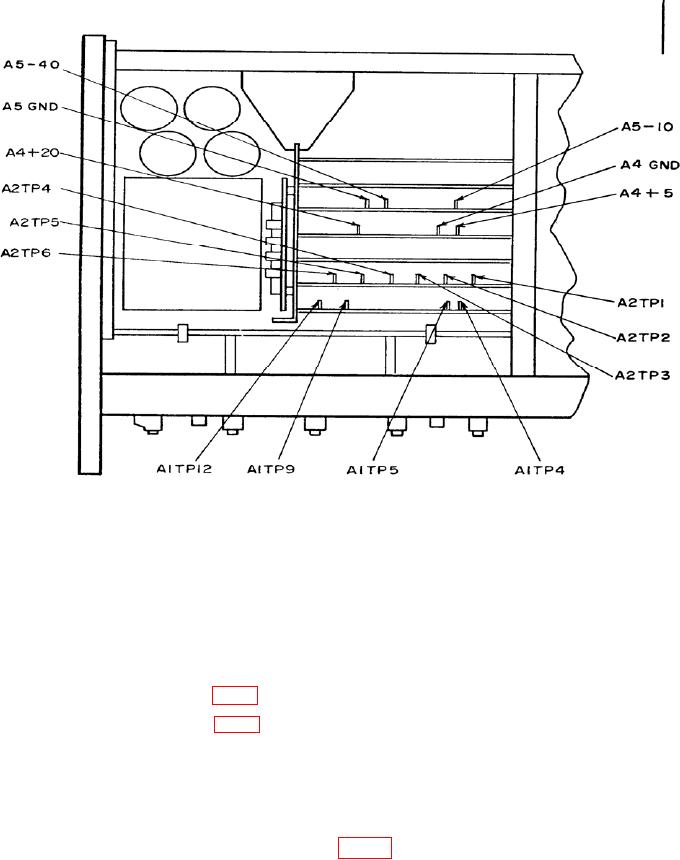
Figure 3. Model 8620C - partial top view.
(3) Press FULL SWEEP pushbutton. Set sweep MODE switch to MANUAL and
MANUAL control fully ccw. If multimeter does not indicate between -0.001 and +0.001 V
dc, perform b (1) below.
(4) Adjust MANUAL control fully cw. If multimeter does not indicate between
9.995 and 10.005 V dc, perform b (2) below.
b. Adjustments
(1) Adjust A A2R21 (fig. 1) for 0.000 V dc on multimeter (R).
(2) Adjust B A2R22 (fig. 1) for 10.000 V dc on multimeter (R).
10. Start Marker/Stop Marker (Model 8620C)
a. Performance Check
(1) Set STOP MARKER (red pointer) to the 0-V mark on calibration scale.
(2) Connect multimeter to A2TP2 (fig. 3) and ground.
If multimeter does not
indicate between -0.001 and +0.001 V dc, perform b (1) below.
(3) Set STOP MARKER pointer to the 10-V mark on calibration scale.
If
multimeter does not indicate between +9.995 and +10.005 V dc, perform b (2) below.