

TB 9-6625-2270-24
b. Adjustments. No adjustments can be made.
12. Resistance
a. Performance Check
(1) Connect calibrator OUTPUT terminals to TI K
and COMMON terminals.
Press TI K function and 200 range pushbuttons.
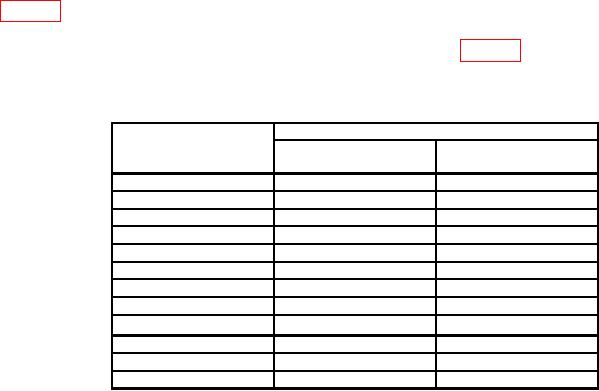
(2) Set TI range and calibrator to the nominal resistance outputs as listed in
table 7. At each resistance output adjust the calibrator output adjustment control knob for
a calibrator control display reading equal to the TI indication. The calibrator control
display ERR indication will be within the specified limits of table 7.
b. Adjustments. No adjustments can be made.
Table 7. Resistance
Calibrator
Test instrument
range
ERROR display
Output nominal
pushbutton
resistance value
indication (%)
1
0.110
200
100
0.105
200
190
0.110
2
1.0
k
0.105
2
1.9
k
0.110
20
10
k
0.105
20
19
k
k 2
200
0.110
100
0.105
200
190
k
0.110
2000
1.0
M
0.105
2000
1.9
M
0.220
20
M
10
M
0.210
20
M
19
M
1 Set
calibrator 2 wire comp to ON.
2
Set calibrator 2 wire comp to OFF.
13. Final Procedure
a. Deenergize and disconnect all equipment.
b. Annotate and affix DA label/form in accordance with TB 750-25.