

TB 9-6625-2303-24
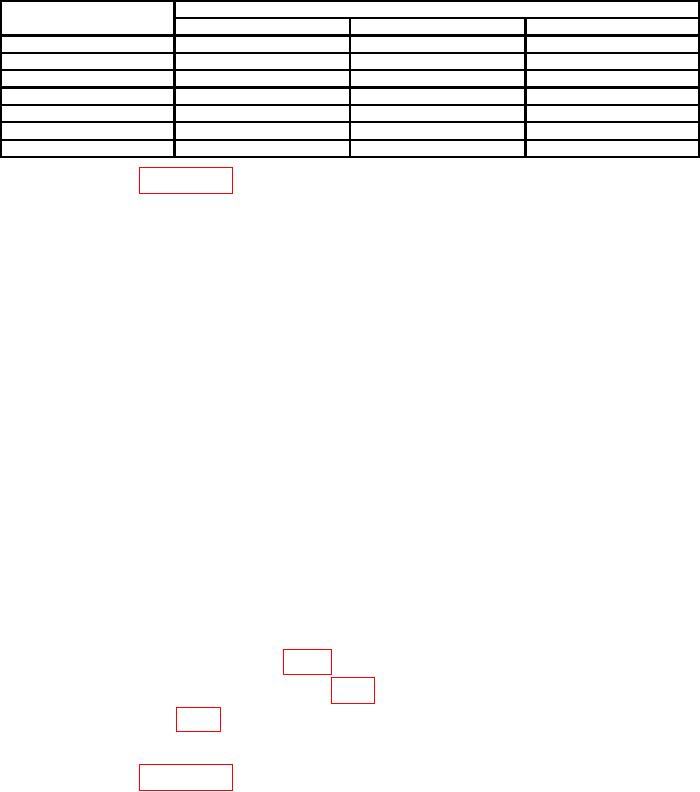
Table 3. Wattmeter Mainframe Calibration.
Multimeter indications (V ac)
Test instrument range
switch settings
Min
Max
Ideal
100
1.575
1.607
1.591
30
0.8861
0.9040
0.8950
10
0.4980
0.5080
0.5030
3
0.2802
0.2858
0.2830
1
0.1575
0.1607
0.1591
0.3
0.0882
0.0908
0.0895
0.1
0.0495
0.0511
0.0503
(8) Repeat paragraph 7 b through f above with TI in the horizontal position.
(9) Perform steps (1) through (7) above.
(10) Remove calibration element from TI.
b. Adjustments
(1) Remove four screws from side of TI and pull back cover straight off.
NOTE
Ensure male end of BNC T connector is connected to
calibration element.
(2) Connect one BNC T connector female end to audio analyzer output.
(3) Connect other end of BNC T connector to frequency counter.
(4) Adjust audio analyzer frequency controls for a frequency counter indication
1000 Hz.
(5) Disconnect frequency counter from BNC T connector.
(6) Connect end of BNC T connector to multimeter (ac mode).
(7) Set TI range switch to 1.
(8) Adjust audio analyzer amplitude output controls for a multimeter indication
between 0.1591 V rms, 0.00005 V rms.
(9) Locate access hole to R26 (fig. 1).
(10) Pierce paper strip covering R26 (fig. 1) adjustment.
(11) Adjust R26 (fig. 1) until meter pointer rests on 1 on the uppermost scale.
(12) Replace back cover and four screws removed in b (1) above.
(13) Repeat paragraph 8 a above.
6