

TB 9-4931-491-24
(7) Using standard tuned level measurement techniques, verify the measuring
receiver indicates within minimum and maximum limits for TI OUTPUT control settings
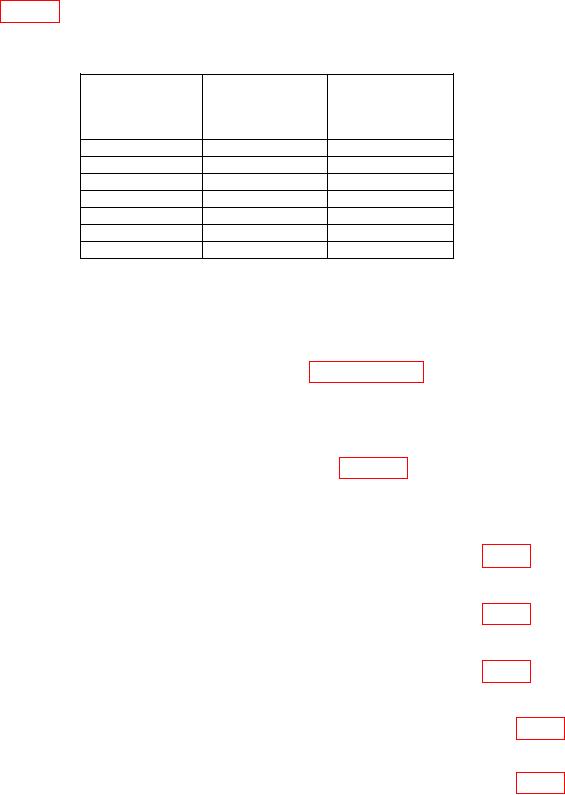
as listed in table 3 below.
Table 3. 250 MHz Attenuator Test
Test instrument
OUTPUT
control
Min
Max
(dBm)
-10
-10.5
-9.5
-20
-20.5
-19.5
-30
-30.5
-29.5
-40
-40.5
-39.5
-50
-50.5
-49.5
-60
-60.5
-59.5
-70
-70.5
-69.5
b. Adjustments. No adjustments can be made.
14. Power Supply
NOTE
Do not perform power supply checks (paragraphs 14 through
17) if all other parameters are within tolerance.
NOTE
Remove TI top cover, left side panel, and M2H module cover
before starting performance checks. (See figure 5 for location of
monitoring points and adjustments.)
a. Performance Check
(1) Connect multimeter to pin 6 on power plug and chassis ground (fig. 4).
(2) If multimeter does not indicate between +17.90 and +18.10 V dc, perform b (1) below.
(3) Connect multimeter to pin 4 on power plug and chassis ground (fig. 4).
(4) Multimeter will indicate between -17.50 and -18.50 V dc.
(5) Connect multimeter to pin 5 on power plug and chassis ground (fig. 4).
(6) Multimeter will indicate between -19.70 and -20.3 V dc.
(7) Connect multimeter to pin 3 on the remote jack and chassis ground (fig. 4).
(8) Multimeter will indicate between -15-90 and -16.10 V dc. Record indication.
(9) Connect multimeter to pin 2 on the remote jack and chassis ground (fig. 4).