

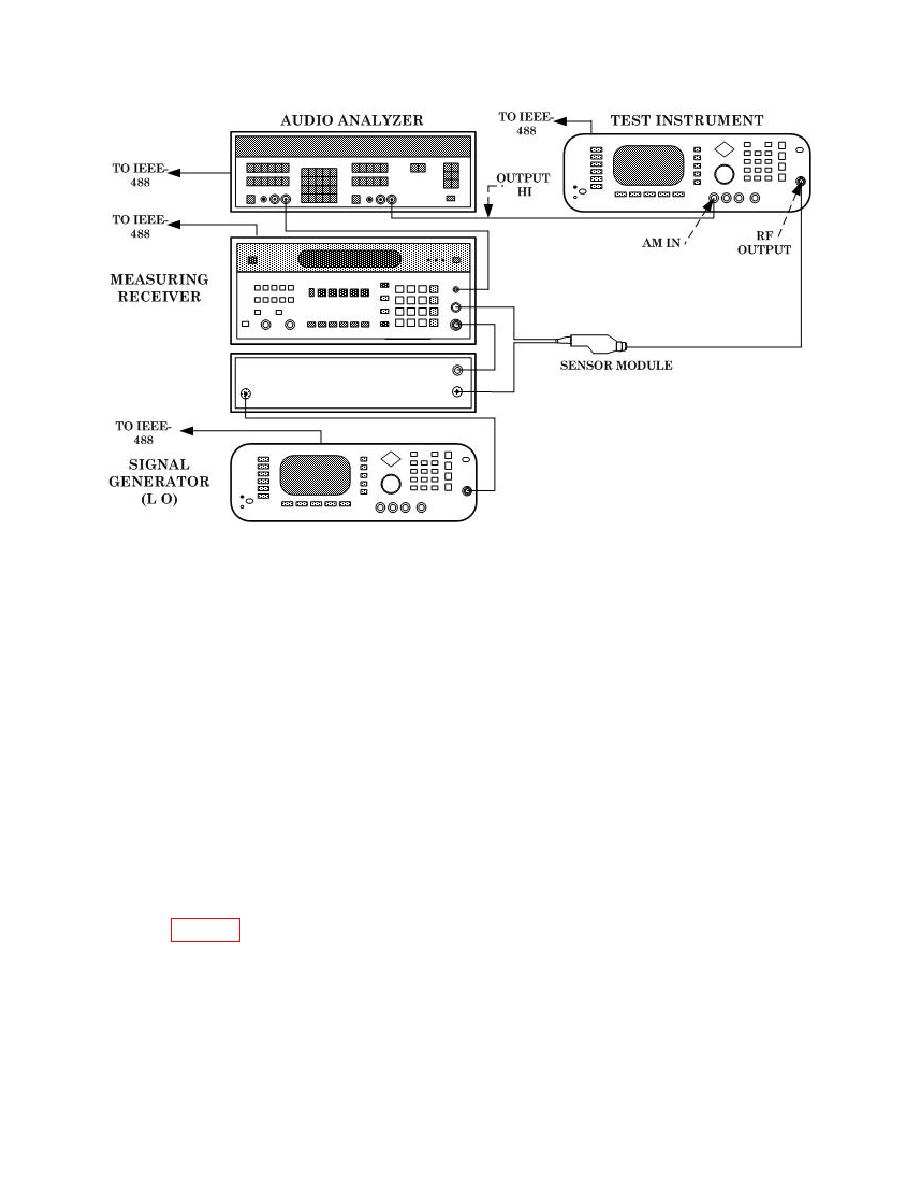
TB 9-6625-2323-35
(3) Set measuring receiver to measure amplitude modulation, with +PEAK
detector, 300 Hz high pass and 3 kHz Lo pass filters and at a frequency of 5 GHz.
(4) Press TI keys as listed in (a) through (i) below.
(a) System, Reset.
(b) Output On Off to off.
(c) Level Control, L1, Edit L1, -3, and MHz ms dB.
(d) Frequency Control, F0, Edit F0, 5, and GHz Sec dBm.
(e) Output On Off to on.
(f) Modulation, AM, More, Log/Linear to display Depth in %, and
Previous Menu.
(g) Edit Depth, 5, 0, Edit Depth.
(h) Mod. Wave, press arrow key to highlight sine wave, press Select, and
Previous Menu.
(i) Edit Rate, 1, kHz s Step, and Edit Rate.
(5) Verify that the measuring receiver indicates within 50% AM @ 5 GHz limits
listed in table 12.
(6) Press TI keys as listed in (a) through (d) below.
(a) Modulation, AM, More, Log/Linear to display Depth in %, and
Previous Menu.
(b) Edit Depth, 3, 0, Hz ns Adrs, Edit Depth.
