

TB 9-6625-2332-40
(14) Set digitizing oscilloscope channel 3 and trigger probe attenuation to 10.
(15) Setup digitizing oscilloscope to measure pulse width.
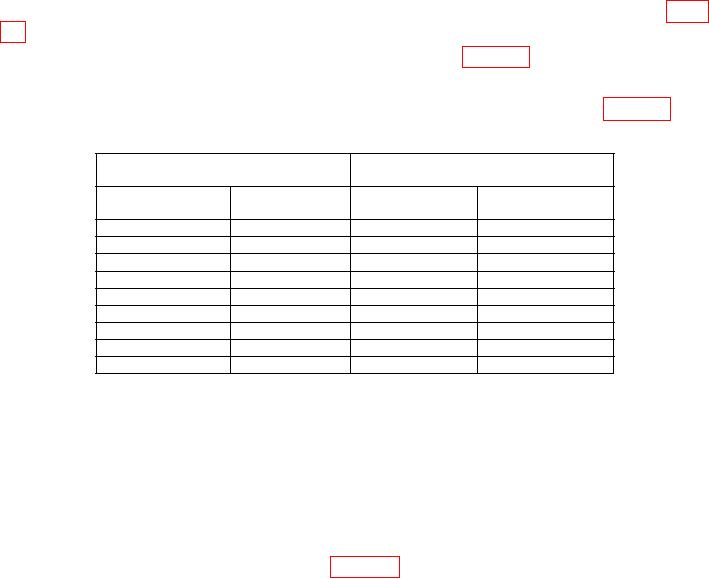
(16) Verify that the digitizing oscilloscope indicates within the limits listed in table
13 for the Per and Wid setting.
(17) Set TI to the next Per and Wid settings listed in table 13.
(18) Repeat (15) through (17) above.
(19) Repeat (18) above for the remaining Per and Wid settings listed in table 13.
Table 13. 9215 Pulse Width
Digitizing oscilloscope
Test instrument settings
indications (sec)
Per setting
Wid setting
Min
Max
20 nsec
10 nsec
9.62
nsec
10.38
nsec
200 nsec
100 nsec
99.25
nsec
100.8
nsec
sec
500 nsec
497.2
nsec
502.8
nsec
1
sec
sec
sec
sec
4
2
1.99
2.01
sec
sec
sec
sec
20
10
9.95
10.05
sec
sec
sec
sec
200
100
99.5
100.5
2 msec
1 msec
.995 msec
1.005 msec
20 msec
10 msec
9.95
msec
10.05
msec
200 msec
100 msec
99.5
msec
100.5
msec
(20) Press DISABLE pushbutton (model 9215 output module) to off (red light lit).
(21) Disconnect cable from TI 9215 module OUTPUT.
b. Adjustments. No adjustments can be made.
12. Pulse Jitter
a. Performance Check
(1) Connect equipment as shown in figure 3.
(2) Reset digitizing oscilloscope and cal the gain.
(3) Press TI pushbuttons as listed in (a) through (h) below:
(a) CHANNEL A.
(b) Vhigh and enter 5 from data keyboard and press ENTER/Hz.
(c) Vlow and enter 0 from the data keyboard and press ENTER/Hz.
(d) Lead and enter .9 from data keyboard and press n/GHz.
(e) Trail and enter .9 from data keyboard and press n/GHz.
(f) Per and enter 20 from data keyboard and press n/GHz.
(g) Wid and enter 10 from data keyboard and press n/GHz.
(h) Press DISABLE pushbutton (model 9211 output module) to on (red light
extinguished).