

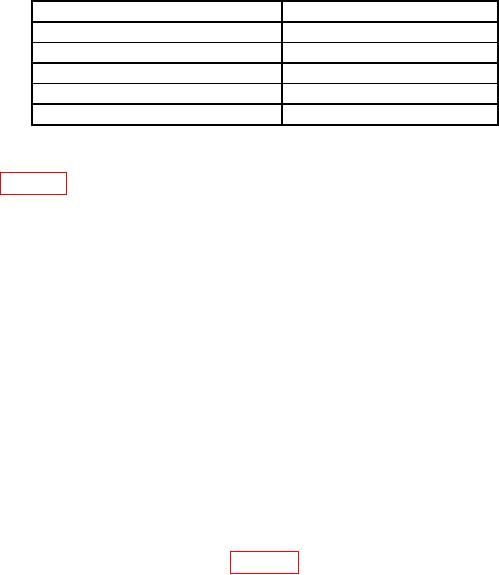
Model
Page
1735A
A-1
6654A
A-3
E3631A
A-5
E3633A
A-8
E3645A and E3646A
A-12
Model 1735A Calibration
If readjustment is required, use the following procedure. Locations of the adjustments are
shown in figure 6.
a. Set the front panel controls of the Model 1735A as follows:
(1) Coarse and Fine VOLTAGE controls fully clockwise.
(2) Coarse and Fine CURRENT controls fully clockwise.
(3) Power switch to On.
b. Connect the Multimeter to measure the voltage at pin 7 of IC2 with respect to the
front panel red (+) output jack. Adjust R21 (R) for -5.00 volts on the Multimeter.
c. Connect the Multimeter to measure the voltage at pin 1 of IC2 with respect to the
front panel red (+) output jack. Adjust R63 (R) for 0 + 10 mV on the Multimeter.
d. Connect the Multimeter to measure the DC voltage between the black (-) and red (+)
output jacks. The voltage should be 30 to 32 volts, the green CV indicator should be
lit, and the red CC indicator should be off.
e. Set the front panel Fine VOLTAGE control for a reading of 30.00 volts on the
Multimeter. Adjust upper GREEN R304 (R) for a front panel meter reading of 30.00
volts on the GREEN VOLTAGE meter.
f. Set the front panel Coarse VOLTAGE control for a reading of 04.00 to 06.00 volts on
the GREEN VOLTAGE meter.
g. Connect equipment as shown in figure 7. Set dc current shunt range plugs to 10
amperes range. The red CC indicator should illuminate and the green CV indicator
should extinguish.
h. Set the front panel Fine CURRENT control for a reading of 3.000 amps on the
Multimeter. Adjust lower RED R304 (R) for a front panel meter reading of 3.000
amps on the RED CURRENT meter.