

TB 9-6625-1996-24
b. Adjustments
(1) Substitute signal generator for function generator.
(2) Connect signal generator RF OUTPUT connector to TI CHANNEL A input.
(3) Connect signal generator external reference input connector (rear panel) to TI
FREQ STD OUTPUT 10 MHz connector (rear panel).
(4) Extend front panel display assembly using extender cable 05345-60205.
Disconnect CHAN A P1 cable from A9 J1 CHA (CHAN B P2 cable to A9 J2 CH B for
CHANNEL B) and connect A9 J1 CH A (A9 J2 CH B for CHANNEL B) to oscilloscope
Vertical 1 input.
(5) Position TI CHANNEL A and CHANNEL B controls as listed in (a)
through (f) below:
LEVEL control to PRESET.
(a)
SLOPE switch to +.
(b)
IMPEDANCE switch to 50Ω.
(c)
ATTEN switch to X1.
(d)
COUPLING switch to DC.
(e)
CHECK-COM A-SEP switch to SEP.
(f)
(6) Set signal generator frequency to 100 MHz and amplitude to 25 mV.
(7) Position oscilloscope controls as listed in (a) through (f) below:
Vertical 1 scale to 200 mV.
(a)
Sweep speed to 20 ns.
(b)
Press Horizontal Delayed (lit) and set sweep speed to 10 ns.
(c)
Trigger Sweep to Auto.
(d)
Trigger Source to 1.
(e)
Trigger Coupling to DC.
(f)
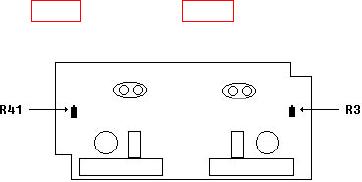
waveform displayed on oscilloscope (R).
Figure 2. A3 input attenuator (component side).
(9) While alternately setting CHANNEL A and CHANNEL B SLOPE switches to
(+) and (-), observe that waveform maintains its symmetrical form.
(10) Repeat (8) and (9) above as required to compensate for interaction.
7