

TB 9-6625-2190-24
(7) Connect the high voltage probe's cable to TI VΩ
and COM, observing correct
polarity. Connect the probe's ground lead to calibrator OUTPUT LO. Hold the probe by
the black handle and connect the probe tip to calibrator OUTPUT HI.
(8) Set TI to 3.200 V range, calibrator set to 1000 V.
(9) Push calibrator OPR/STBY button to OPR, TI should indicate between .990
and 1.010 V. No calibration adjustments can be made on the probe.
(10) Set calibrator to STBY.
(11) Disconnect all connections.
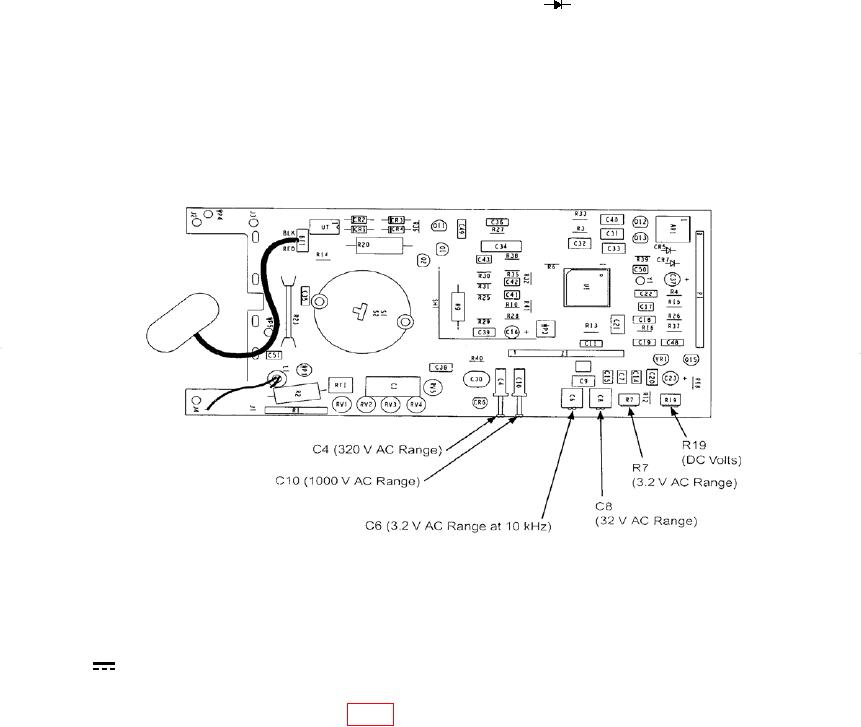
Figure 1. Adjustment locations.
b. Adjustments
(1) With same connection as made in step 8 a (1) above, and function switch set to
V, press RANGE pushbutton for 3.200 V range.
(2) Set calibrator for a 3 V dc output, push calibrator OPR/STBY button to OPR.
(3) Adjust R19 (DC Volts) (fig. 1) until TI indicates 3.000 V dc. (R)
(4) After adjustment is made set calibrator to STBY and repeat performance check
8 a (1) through (11) above.
9. Dc Current
a. Performance Check
(1) Connect calibrator OUTPUT HI and LO to TI mA/A and COM.